Robot Gadgets 2026: Desk Robots, Electronic Robots & Coding Kits
Looking for robot gadgets that do more than sit on a shelf? Explore desktop companion robots, fun electronic robots and programmable robotics kits for adults and beginners. Compare what each robot does, who it suits and what to check before buying.
Updated October 12, 2026
Which Robot Gadget Is Right for You?
Not every electronic robot is a toy, and not every desk robot needs coding. Start with what you want your robot to do.
Desktop robots for everyday fun
Want a small robot for your desk? Companion models such as Eilik focus on expressions and reactions, while LOOI uses a compatible smartphone as part of the experience. These are the easiest starting points if you do not want to build or program a robot.
Programmable robots for adults
Prefer experimenting with code, sensors and movement? Try a Makeblock mBot2 or a PiCar-X project. Check whether a computer, Raspberry Pi, phone app or additional components are required before choosing a kit.
Electronic robots and creative builds
Robot cars, tracked robots, walking hexapods and robot arms offer different challenges. Cars are useful for navigation experiments; arms are suited to motion control; and walking robots introduce balance and gait programming. Compare options in the quick comparison table.
Desktop Robots and Desk Companions With Personality
These desktop robots are ready-to-use electronic companions rather than construction kits. Choose Eilik for expressive reactions or LOOI if you like the idea of giving a compatible smartphone a moving robot body. Neither is the same as a programmable build kit.

Eilik Desk Robot: Expressive Desktop Companion
Meet Eilik — the expressive desktop robot toy going viral. Videos, photos, and why it’s everywhere right now.

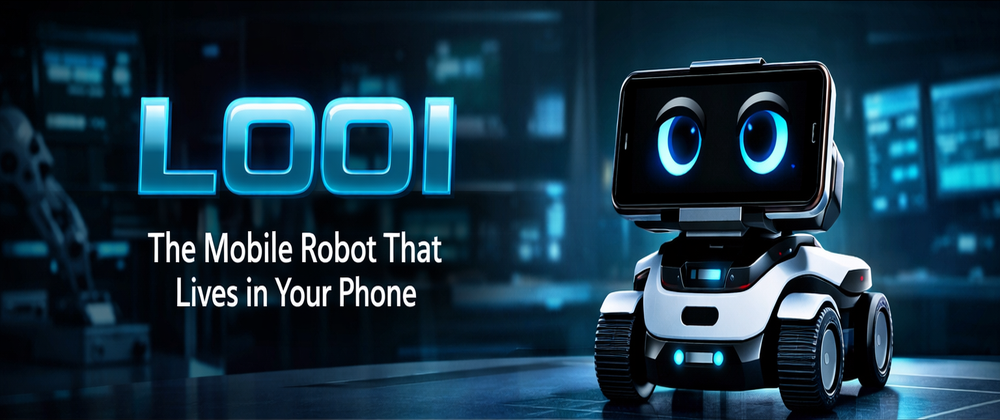
LOOI: The Mobile Robot That Lives in Your Phone
LOOI docks your smartphone and turns it into a rolling, expressive desk robot — movement + personality powered by your phone.

Starter Robots Under $300
These programmable robot kits are aimed at beginners and curious adults who want to learn how electronic robots work. If you’re new to robotics, start here: build a bot, learn code, and actually see results fast.

Makeblock mBot2 ~ $149.99
A legit first robotics kit: assemble it fast, then learn block coding or Python while experimenting with sensors, lights, and movement.
- Perfect first robot
- Scratch & Python
- Sensors + LED matrix
- Expandable modules

mBot2 Rover Kit ~ $259.99
The tougher rover-style build for bigger projects. More stable platform for experimenting with navigation, obstacle avoidance, and outdoor surfaces.
- Rugged rover build
- Better traction
- Project-friendly chassis
- Great for navigation

Sphero indi Kit ~ $150
A super-friendly starter bot that teaches logic and sequencing with color tiles, plus app-based coding once you’re ready for more.
- Coding tiles + app
- No-solder learning
- Fun challenges
- Great for beginners

Sphero BOLT+ ~ $199
A programmable robot ball with a bright LED matrix and onboard sensors. Great for coding games, tricks, and sensor-based challenges.
- LED matrix
- Sensors (gyro/accel)
- App coding
- Creative challenges

Zumo 32U4 OLED ~ $195
Compact tracked robot that’s perfect for classic robotics missions: line following, obstacle avoidance, and sensor experiments.
- Tracked drive
- OLED display
- Line following
- Arduino-friendly

SunFounder PiCar-X ~ $179.99
A Raspberry Pi robot car with a camera—perfect if you want to jump into computer vision and “AI robot” style projects.
- Raspberry Pi powered
- Camera + vision
- AI-ready projects
- Expandable
Quick Demo Videos
Watch these kits in action before you buy.
mBot2 — Getting Started
Sphero indi — Intro & Coding
PiCar-X — Demo
Fast Picks (If You Don’t Want to Overthink It)
Three quick “grab-and-go” choices depending on what you want to build.
BEST VALUE Makeblock mBot
Start here if you want an easy build + quick coding wins without spending much.
BEST LEARNING Freenove Hexapod
Perfect if you want motion control, gait programming, and “walking robot” projects.
GO BIG myAGV Platform
If you want “real robotics” vibes: autonomy, navigation, and bigger experiments.
Quick Compare Table
Pick a lane fast: skill level, price range, and what you’ll actually build.
| Product | Skill | Price | Best For | Link |
|---|---|---|---|---|
| Makeblock mBot | Beginner | ~ $70+ | First build, sensors, Scratch/Python basics | Amazon |
| Gewbot Smart Car | Beginner | ~ $90+ | Wi‑Fi control, obstacle avoidance, car chassis builds | Amazon |
| Freenove Tank Robot | Beginner | ~ $115+ | Tracked movement, indoor missions, camera-style projects | Amazon |
| Freenove Hexapod | Intermediate | ~ $250+ | Walking gaits, motion control, “wow” builds | Amazon |
| Adeept Robot Arm | Intermediate | ~ $70+ | Pick-and-place basics, automation experiments | Amazon |
| Hiwonder SO-ARM101 | Intermediate+ | ~ $300+ | Upgrade-friendly arm platform, deeper control projects | Amazon |
| SpiderPi Pro | Advanced | ~ $550+ | High-end “showpiece” bot, desk flex, advanced builds | Amazon |
| MentorPi T1 | Advanced | ~ $575+ | Autonomy-style robot car projects, future upgrades | Amazon |
| myAGV Platform | Advanced | ~ $1000+ | Navigation, mapping vibes, bigger “real robotics” experiments | Amazon |
How to Choose (WolfieWeb Quick Rules)
Want fast fun? grab a car or mBot. Want challenge? go hexapod. Want automation? robot arm. Before buying, check the maker’s support page, app compatibility, replacement parts and recent owner feedback. Store listings can change or combine several product versions on one page.

Build • Code • Create — Next-Gen Robotics Kits
More killer builds for makers ready to level up — robot cars, arms, and walking bots with that WolfieWeb neon lab vibe.

BEST VALUEMakeblock mBot ~ $70+
Classic starter robot with sensors + Scratch/Python-ready coding. Simple build, fast wins.

Gewbot Smart Car ~ $90+
DIY Wi‑Fi robot car with obstacle avoidance — perfect “first real robot” vibes.

Freenove Tank Robot ~ $115+
Tracked robot with camera-style projects and rugged movement. Great for indoor missions.

BEST LEARNINGFreenove Hexapod ~ $250+
Walking spider bot for motion control + advanced coding challenges. Looks insane on video.

Adeept Robot Arm ~ $70+
Multi‑axis arm kit for automation, pick‑and‑place, and learning control.

Hiwonder SO‑ARM101 ~ $300+
Open-source arm platform that’s perfect for upgrades. Great “learn robotics control” kit.

SpiderPi Pro ~ $550+
High-end AI hexapod vibe — built to flex on your desk. Pure “wow” factor.

MentorPi T1 ~ $575+
AI robot car style build — awesome for autonomy experiments and future upgrades.

GO BIGmyAGV Platform ~ $1000+
Autonomous platform vibes — mapping + navigation projects if you want “real robotics.”

xArm UNO ~ $320+
Arduino robotic arm kit for precision control experiments. Great for small automation builds.
Robot Gadget Buying Questions: Desk Robots and Coding Kits
The details that matter once the novelty wears off.
What is the best robot gadget for a desk?
Eilik is a strong choice if you want expressive personality and reactions. LOOI is more suitable if you want your smartphone to become the screen and processing center for a moving companion robot.
What is a good first robotics kit?
Makeblock mBot2 is one of the easier starting points because beginners can use block coding before moving into Python. It also provides immediate feedback through movement, sensors, lights and sounds.
Are programmable robots for adults or children?
Both. Many kits are sold as educational products but can also be useful for adult hobbyists. Look for supported programming languages, documentation and upgrade options rather than relying on the age label alone.
What is the difference between a desk robot and a robot kit?
A desk companion is generally ready to use and emphasizes interaction. A robotics kit usually requires assembly, coding or both, and is better suited to learning how sensors, motors and software work together.
Do robot gadgets require programming?
Many desk companions work immediately without programming. Build kits generally start with an app or visual block coding, while more advanced models support Python, Arduino or deeper hardware experiments.
What should I check before buying?
Check app compatibility, account requirements, battery life, replacement parts, privacy controls and recent software support. For a child or beginner, also check assembly difficulty and whether an adult must provide ongoing help.
Explore More Robots on WolfieWeb
Interested in robots beyond desk companions and coding kits? Browse the WolfieWeb Robot Database to discover humanoids, home robots and other machines.
Explore the Robot Database